Various useful patterns for building 'HTML tools'
Open source developer
Useful patterns for building HTML tools
https://simonwillison.net/2025/Dec/10/html-tools/
What HTML tools should be like
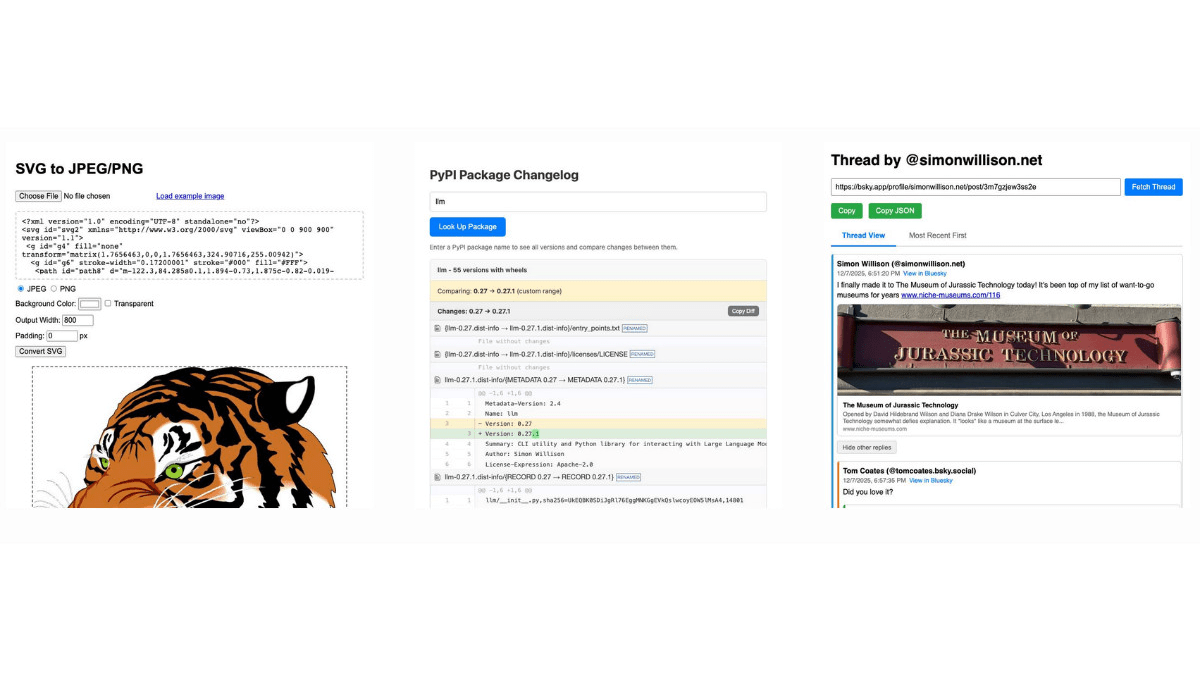
Some of the HTML tools Willison has developed include:
svg-render : A tool that renders SVG code into downloadable JPEGs and PNGs.
pypi-changelog : A tool to create diffs between different PyPI package releases and copy them to your clipboard
bluesky-thread : A tool that generates a nested view of discussion threads on Bluesky.
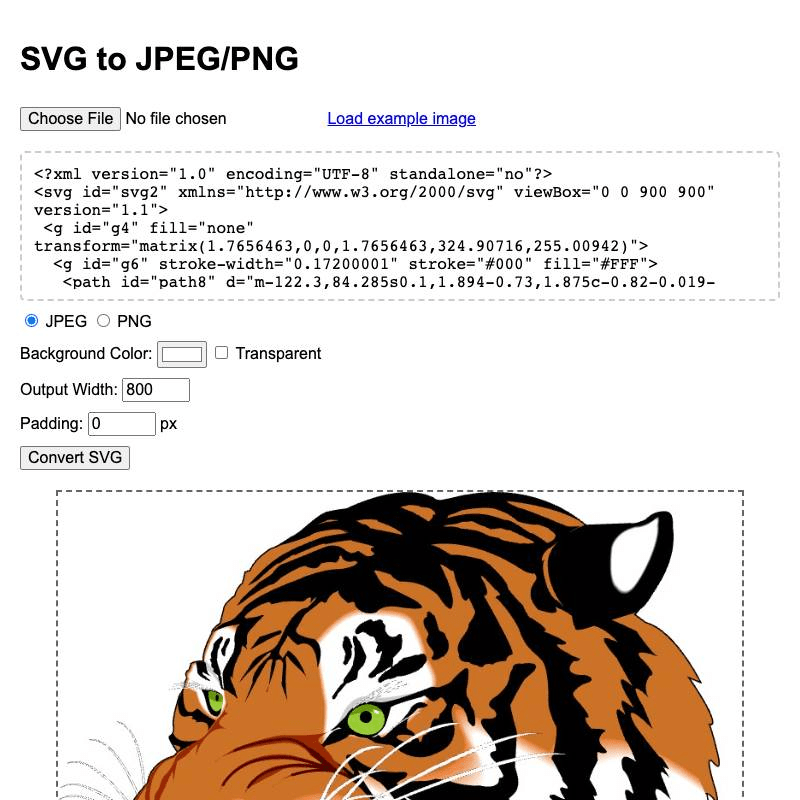
From the perspective of having created the HTML tool above, Willison outlines the characteristics of what an HTML tool should be like.
・Consists of a single HTML file
JavaScript and CSS are inlined in the HTML file
Don't use libraries that require build steps, like React.
Load dependencies from
- Keep it as small as possible
◆ Development process
The easiest way to create an HTML tool is to use Claude's 'Artifacts' feature, or ChatGPT's or Gemini's 'Canvas' feature, Willison says. For example, if you want to create an HTML tool that can paste JSON and convert it to YAML using these LLMs, you would use the following instructions in Gemini or ChatGPT:
[code]
Build a canvas that lets me paste in JSON and converts it to YAML. No React.
[/code]
Claude would give the following instructions:
[code]
Build an artifact that lets me paste in JSON and converts it to YAML. No React.
[/code]
The reason we specified 'No React' in both cases is that if we didn't do this, code specifically for React would be generated, making it difficult to copy and paste the code output by LLM. Another issue is that React code requires a build step, which can take a long time to display. For more complex projects, using a coding agent like Claude Code or Codex CLI allows you to test your code as you develop it.
◆ Use of CDN
When using third-party JavaScript libraries, Willison recommends loading them via a CDN. Major LLM platforms such as Claude, ChatGPT, and Gemini support specific CDNs as features of Artifact and Canvas, so if you specify a command like 'Use PDF.js,' PDF.js will be loaded from the appropriate CDN. If you don't use a CDN, an alternative is to use npm , but this requires a build step, which reduces the productivity of analysis and makes self-hosting cumbersome.
◆Hosting
Willison does not recommend hosting HTML tools on LLM platforms because they tend to run hosted tools in a restrictive sandbox and are less reliable than other static hosting options. Willison recommends
◆Reusing existing tools
Willison has compiled over 100 of his own HTML tools into a single public collection, and he says the biggest benefit of doing so is that the LLM assistant can easily combine them in interesting ways. He also says that reusing existing tools makes it much more likely that the code generated by LLM will work properly.
For example, when I created the pypi-changelog, I first gave the following instructions to Claude Code:
[code]
Look at the pypi package explorer tool
[/code]
After LLM found and read the source code of zip-wheel-explorer , they created the HTML tool by giving the following instructions:
[code]
Build a new tool pypi-changelog.html which uses the PyPI API to get the wheel URLs of all available versions of a package, then it displays them in a list where each pair has a 'Show changes' clickable in between them - clicking on that fetches the full contents of the wheels and displays a nicely rendered diff representing the difference between the two, as close to a standard diff format as you can get with JS libraries from CDNs, and when that is displayed there is a 'Copy' button which copies that diff to the clipboard
[/code]
The summary of these instructions is as follows:
Create a new tool called 'pypi-changelog.html' that uses the PyPI API to get wheel URLs for all available versions.
- Display a 'Show changes' button between each pair
Click the 'Show changes' button to display the entire contents of the wheel and see the differences between them.
Use a CDN's JS library to display diffs as close to the standard diff format as possible.
- Prepare a 'Copy' button, and when clicked, copy the contents of the diff to the clipboard.
◆Major features and techniques
Willison lists the following key features and techniques that are useful when creating HTML tools:
Copy and paste: the most useful input/output mechanism for HTML tools
Creating debugging tools: These can be great tools for exploring the possibilities of HTML tools, such as clipboard viewers and keyboard debugging .
・State persistence: Use URLs, LocalStorage, etc.
・Utilizing CORS- compatible APIs: Use APIs provided by LLMs such as OpenAI, Anthropic, and Gemini.
Don't be afraid of file manipulation: JavaScript can directly access file contents and even generate files for download.
Use of Pyodide and WebAssembly: Run Python code in the browser and load software written in other languages.
Summary
Willison points out that just as important as patterns and techniques is to 'record all interactions with LLM.' Recording and publishing these will help improve your skills in using LLM. He concludes by saying that if you want to create your own HTML tool, you can create a free GitHub repository with GitHub Pages enabled, copy and paste the HTML pages you generate using your preferred method, and start developing right away.
Related Posts: