Yet-Another-Bench-Script is a free and easy way to benchmark Linux servers.
While many benchmark scripts exist for Linux servers, ' Yet-Another-Bench-Script ' has been released that allows you to run proven tools such as fio , iperf3 , and Geekbench all at once without needing to install dependent packages or administrator privileges.
masonr/yet-another-bench-script: YABS - a simple bash script to estimate Linux server performance using fio, iperf3, & Geekbench
https://github.com/masonr/yet-another-bench-script
◆Benchmark execution method
Simply connect to the Linux server via SSH and execute the following command.
curl -sL https://yabs.sh | bash
The output first displays basic server data such as CPU and memory capacity.
 Basic Overview Information:
 ---------------------------------
 Uptime: [REDACTED]
 Processor: Intel(R) Xeon(R) CPU E5-2630 v4 @ 2.20GHz
 CPU cores: 40 @ 2157.075 MHz
 AES-NI: Enabled
 VM-x/AMD-V: Enabled
 RAM: 62.2 GiB
 Swap: 4.0 GiB
 Disk: 1.8 TiB
 Distro: [REDACTED]
 Kernel: [REDACTED]
 VM Type: NONE
 IPv4/IPv6: Online/Offline

 IPv4 Network Information:
 ---------------------------------
 ISP: [REDACTED]
 ASN: [REDACTED]
 Host: 【REDACTED】
 Location: Kyoto
 Country: Japan
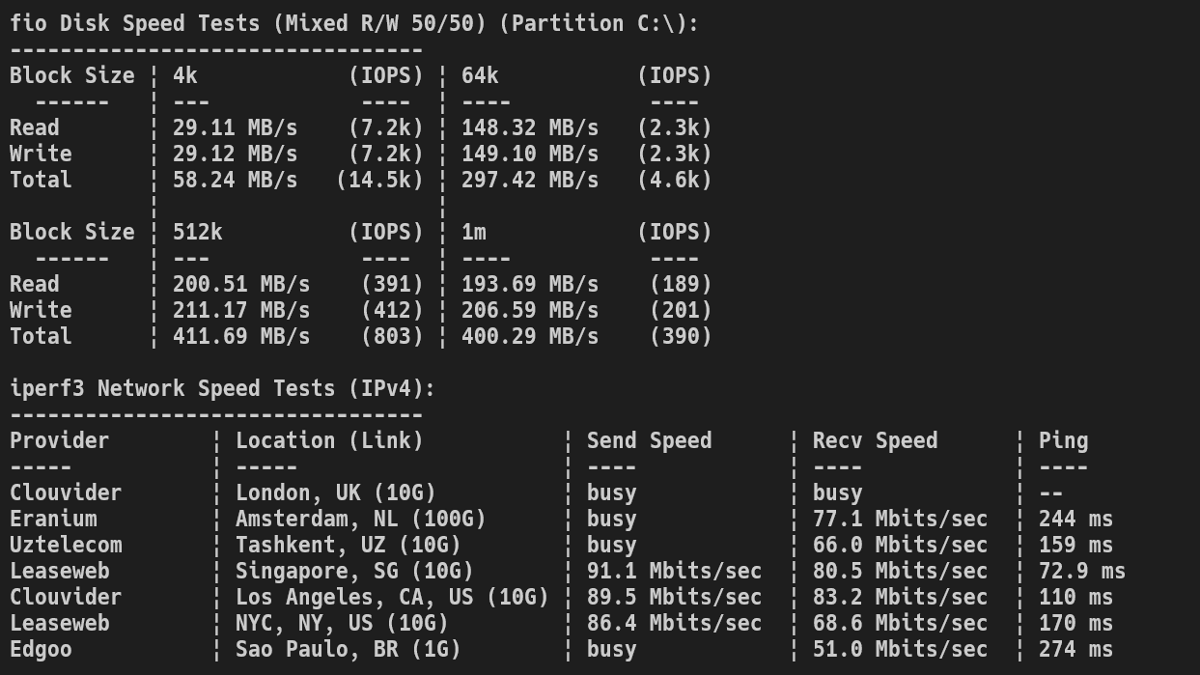
In the disk performance measurement using fio, random read and write speeds were measured for four block sizes: 4k, 64k, 512k, and 1MB.
 fio Disk Speed Tests (Mixed R/W 50/50) (Partition /dev/mapper/almalinux-root):
 ---------------------------------
 Block Size | 4k (IOPS) | 64k (IOPS)
 ------ | --- ---- | ---- ----
 Read | 7.56 MB/s (1.8k) | 58.71 MB/s (917)
 Write | 7.59 MB/s (1.8k) | 59.23 MB/s (925)
 Total | 15.15 MB/s (3.7k) | 117.94 MB/s (1.8k)
 | |
 Block Size | 512k (IOPS) | 1m (IOPS)
 ------ | --- ---- | ---- ----
 Read | 95.96 MB/s (187) | 81.84 MB/s (79)
 Write | 101.06 MB/s (197) | 87.29 MB/s (85)
 Total | 197.03 MB/s (384) | 169.13 MB/s (164)
Results of measuring network speed between multiple locations using iperf3.
 iperf3 Network Speed Tests (IPv4):
 ---------------------------------
 Provider | Location (Link) | Send Speed | Recv Speed | Ping
 ----- | ----- | ---- | ---- | ----
 Clouvider | London, UK (10G) | busy | 81.6 Mbits/sec | 246 ms
 Eranium | Amsterdam, NL (100G) | 91.7 Mbits/sec | 421 Mbits/sec | 253 ms
 Uztelecom | Tashkent, UZ (10G) | 717 Mbits/sec | 214 Mbits/sec | 162 ms
 Leaseweb | Singapore, SG (10G) | 714 Mbits/sec | 650 Mbits/sec | 80.3 ms
 Clouvider | Los Angeles, CA, US (10G) | 812 Mbits/sec | 219 Mbits/sec | 108 ms
 Leaseweb | NYC, NY, US (10G) | 727 Mbits/sec | 498 Mbits/sec | 171 ms
 Edgoo | Sao Paulo, BR (1G) | 398 Mbits/sec | 86.8 Mbits/sec | 329 ms
The Geekbench benchmark results were not displayed this time. Apparently, there has been a problem with Geekbench benchmark results not displaying since around April 2026.
 Geekbench 6 Benchmark Test:
 ---------------------------------
 Test | Value
 |
 Single Core |
 Multi Core |
 Full Test | https://browser.geekbench.com/v6/cpu/18067275

 YABS completed in 15 min 20 sec
◆List of options
For options, specify the flags from the table in the '-flags' section of the following command.
curl -sL https://yabs.sh | bash -s -- -flags
| flag | explanation |
|---|---|
| -b | Prioritize precompiled binaries from the repository over local packages. |
| -f / -d | Disable disk performance testing using fio |
| -i | Disable network performance testing using iperf |
| -g | Disable system performance testing by Geekbench. |
| -n | Skip retrieving and displaying network details |
| -h | Display the help message, flag list, and local package detection status, then exit. |
| -r | Limiting the number of iperf sites to Scaleway and Cloudider LON+NYC will reduce bandwidth usage. |
| -4 | Disable Geekbench 6 and run Geekbench 4 tests. |
| -5 | Disable Geekbench 6 and run Geekbench 5 tests. |
| -9 | Run both Geekbench 4 and 5 instead of Geekbench 6. |
| -6 | Re-enable Geekbench 6 after using -4, -5, and -9. |
| -j | Output the results to the screen in JSON format. |
| -w <filename> | Write the JSON result to the specified filename. |
| -s <url> | Send JSON results to the specified URL |
Although I was unable to display the Geekbench results this time, the ability to easily measure various benchmarks is convenient, and it's a command I'd like to try first when renting a VPS or similar service. Furthermore, it's possible to send the output results to YABSdb or VPSBenchmarks for performance comparisons.
Related Posts: