5 Git commands to help new project members quickly grasp the current state of the repository
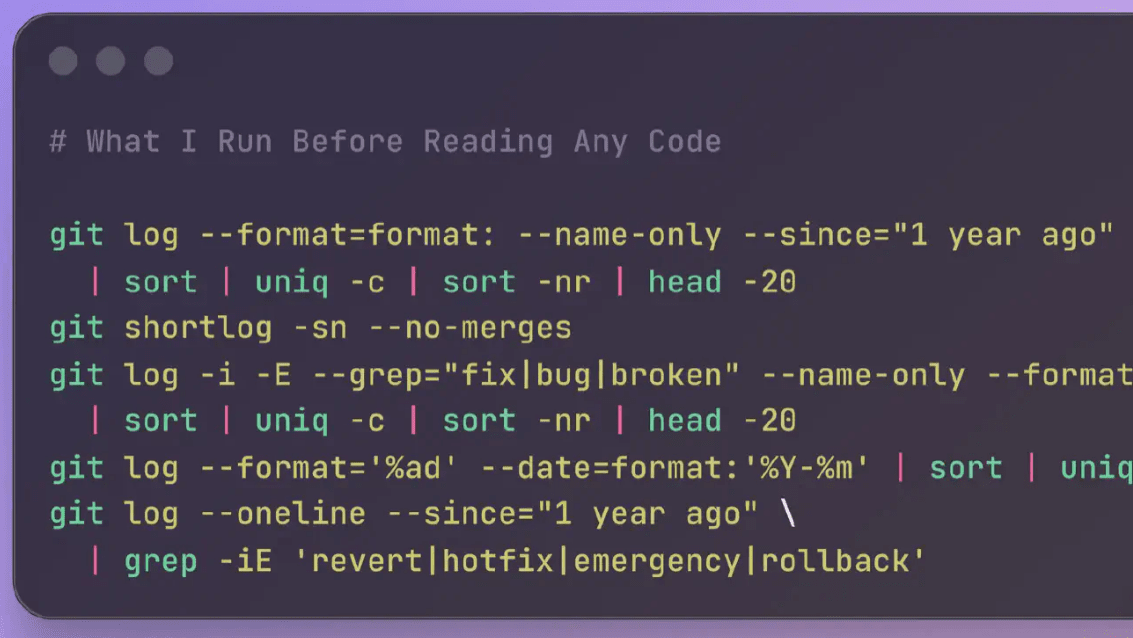
IT engineer Ali Piekhovsky introduces five Git commands that allow you to quickly grasp the current status of a project you're completely unfamiliar with.
The Git Commands I Run Before Reading Any Code
◆The 20 most modified files in the past year
The following command will list the 20 files with the most filename changes over the past year.
[code]
git log --format=format: --name-only --since='1 year ago' | sort | uniq -c | sort -nr | head -20
[code]
By reviewing files that change frequently, you can identify 'actively developed areas' and 'areas that are having widespread, unpredictable consequences.' Piekhovsky states that 'high frequency of changes in files that no one wants to take responsibility for is the clearest sign of codebase stagnation.'
◆Who built the code?
The following command ranks users by the number of commits they have made.
[code]
git shortlog -sn --no-merges
[code]
In the world of software development projects, there is a term called 'bus factor.' The bus factor is used as a numerical value that indicates the probability of a project failing, based on the hypothetical scenario of 'what if that person gets hit by a bus and disappears?'
If one person accounts for 60% or more of the commits in a repository, the bus factor is quite high. If such a key person has left the company, it can be said that the company is in a critical situation.
Piekhovsky also uses a ranking system based on the number of commits made within the last six months, using '--since='6 months ago'', to check the activity level of people who are actually building the code.
Please note that these commands are not applicable if you are using a workflow that combines multiple pull requests into a single commit.

◆Where are the bugs gathering?
The following command lists the files that have been modified the most times in commits that contain commit messages related to bug fixes, such as 'fix,' 'bug,' or 'broken.'
[code]
git log -i -E --grep='fix|bug|broken' --name-only --format='' | sort | uniq -c | sort -nr | head -20
[code]
If you leave clear commit messages for each commit, you can extract and analyze the data based on the content of the commit messages, as described above.
Files that appear repeatedly in bug fixes tend to exhibit a pattern of being 'multiple times corrupted and patched, but not properly fixed.'
◆Is the project accelerating or stagnating?
The following command displays the number of commits per month.
[code]
git log --format='%ad' --date=format:'%Y-%m' | sort | uniq -c
[code]
If the number of commits remains stable each month, it's safe to assume the team is in a healthy state. If the number of commits has halved at any point, it generally means that someone left the team around that time. If the number of commits has been declining for more than six months, it suggests that the team is losing momentum.
Furthermore, if there's a pattern of periods of low activity followed by regular spikes, it suggests the team is bundling and releasing work at regular intervals.

◆ How often does it cause controversy?
The following commands check how often the code has been rolled back or emergency patches have been applied.
[code]
git log --oneline --since='1 year ago' | grep -iE 'revert|hotfix|emergency|rollback'
[code]
While rolling back commits a few times a year is generally not a problem, if you're doing it every few weeks, it's highly likely that a serious problem is hidden beneath the surface. Piekhovsky analyzes that 'this could indicate unreliable tests, a lack of a staging environment, or a deployment pipeline configuration that makes rollbacks difficult.'
Furthermore, if no commits that roll back or apply emergency patches are found, it could mean that the team is stable, or it could mean that 'nobody is writing clear commit messages.'
Mr. Piekhovsky works as a codebase auditor, and he says that he uses the five commands mentioned above to understand the current state of the repository during the first hour of the audit. He also posts on his blog about what he does during the following week, so if you're interested, check it out.
Related Posts:







in Software, Posted by log1d_ts