Firefox 148 official release, AI control settings implemented

The official version of the web browser ' Firefox 148 ' has been released. The 'AI Control' setting has been implemented, which allows users to block the generation AI function.
Firefox 148.0, See All New Features, Updates and Fixes
◆AI control
As previously announced , this update will add an AI Control section to the Settings screen, allowing you to control and manage the use of AI features.
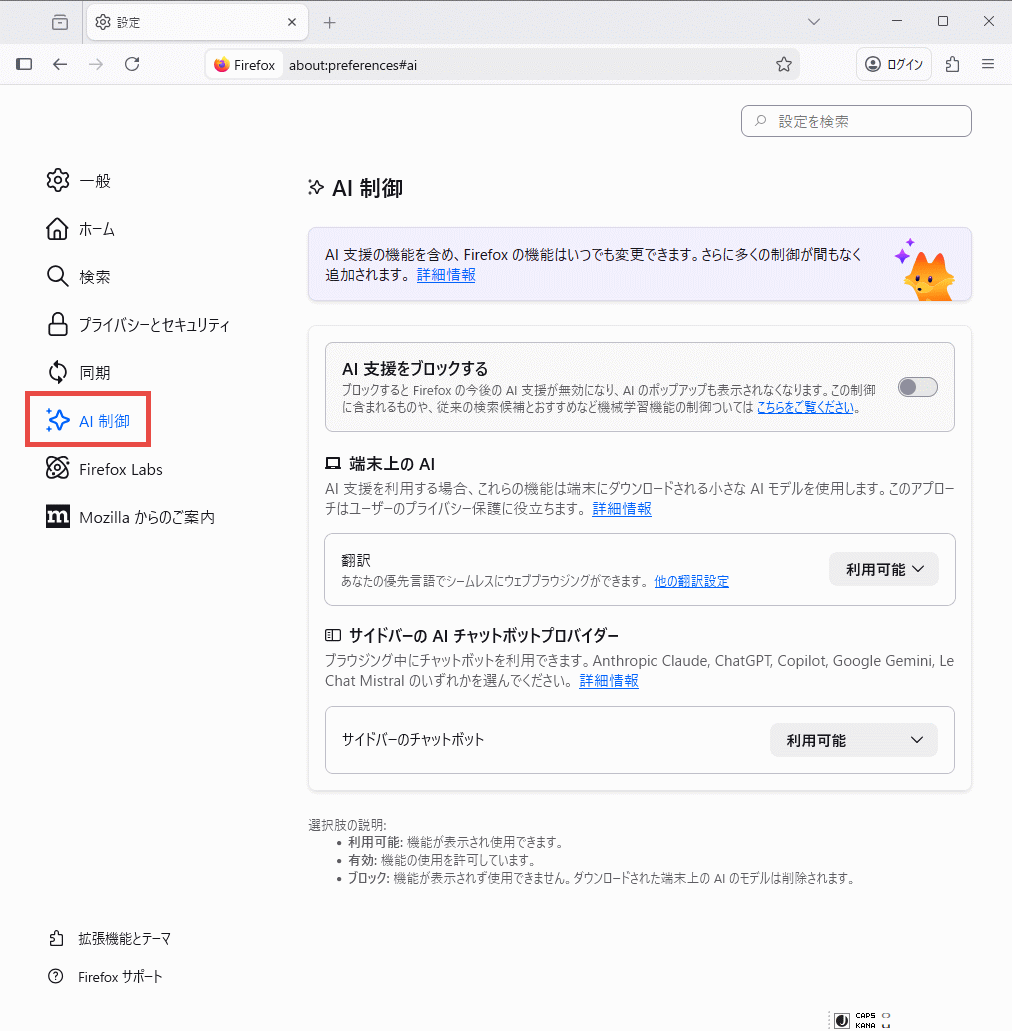
The setting items are as follows.
・Block AI assistance : Off/On
・Translation : Available ・Block
Sidebar chatbots : Available Block Anthropic Claude ChatGPT Copilot Google Gemini Le Chat Mistral
If you turn on 'Block AI assistance,' the following pop-up will appear, and if you press the 'Block' button, all other items will be 'Blocked.'

◆ Support for shape() function
The CSS shape() function is now supported and can be used to define shapes for the clip-path and offset-path properties.
[code]
clip-path: shape(nonzero from 0 0, line to 10px 10px);
[/code]
The shape() function is similar to the path() function but has some advantages:
- Standard CSS syntax available
- Supports various CSS units
- CSS math functions can be used
[code]
offset-path: shape(
from 5% 0.5rem,
arc to 80px 1pt of 10% ccw large rotate 25deg
);
offset-path: shape(
from 5px -5%,
hline to 50px,
vline by calc(0% + 160px),
hline by 70.5px,
close,
vline by 60px
);
[/code]
◆ Sanitizer API support
The Sanitizer API has been introduced to provide safe HTML manipulation. The element.setHTML() method, like element.innerHTML , allows you to insert HTML content into DOM elements, but it also eliminates security vulnerabilities such as cross-site scripting (XSS) . The document.parseHTML() method , which safely parses HTML, is also now available.
Collaborative Iterators
Following the collaborative iterator proposal , the Iterator.zip and Iterator.zipKeyed methods have been added, allowing you to aggregate elements from multiple iterables into a new Iterator object.
[code]
const days = ['Mon', 'Tue', 'Wed', 'Thu', 'Fri'];
const temperatures = [22, 21, 23, 20, 19];
const dayTemperatureMap = new Map(Iterator.zip([days, temperatures]));
console.log(dayTemperatureMap);
// Map(5) { 'Mon' => 22, 'Tue' => 21, 'Wed' => 23, 'Thu' => 20, 'Fri' => 19 }
[/code]
◆Remote improvement
Remote Improvements is a feature that lets you experience Firefox fixes and feature changes early. Opting in to Remote Improvements allows Firefox to automatically install the changes. Previously, opting in to Remote Improvements required sharing technical information and operational data (telemetry) with Mozilla. However, with this update, you can now opt in to receive Remote Improvements even if you opt out of sharing telemetry or participating in Mozilla experimental studies .
◆Other updates
- Improved screen reader access to embedded math formulas in PDFs
- Android version: Refresh toolbar
Android version: Added 'Copy Text' context menu item to copy link text
- Windows version: When dragging a downloaded image to Adobe Illustrator, the image URL was dropped. This has been fixed so that the image is dropped instead.
- Changed blank documents (about:blank) to be web compatible.
- Support for Trusted Types API : Prevents cross-site scripting attacks
Support for the CSS position-try-order property
・WebGPU : Service Worker support
・Support forlocation.ancestorOrigins attribute
Navigation API : Support for the NavigationPrecommitController.addHandler() interface
・Supports translation into Traditional Chinese and Vietnamese
- Fixed an issue where language packs were disabled and displayed in an unexpected language after a major update.
Firefox 148 also includes 51 security bug fixes .
The next major version, Firefox 149, is scheduled to be released on Tuesday, March 24, 2026 local time.
Related Posts:








in Software, Posted by log1c_sh