'Firefox 146' official release, Firefox Labs terms of use for experimental features are lifted and anyone can use it

The official version of the web browser Firefox 146 has been released.
Firefox 146.0, See All New Features, Updates and Fixes
https://www.firefox.com/en-US/firefox/146.0/releasenotes/
◆Firefox Labs now available to all users
Firefox Labs, which gives you access to Firefox's experimental features, is a feature that allows you to experience features that may be introduced in Firefox in the future. Until now, the conditions for using Firefox Labs were to enable Studies and Telemetry . With this update, these restrictions have been lifted, and all users will be able to use Firefox Labs unconditionally.
Developer Tools: Unused custom properties are now hidden by default
Unused custom properties are hidden by default in the Developer Tools, which reduces clutter and may improve the rendering speed of the Developer Tools panel.
◆CSS function: contrast-color()
The contrast-color() CSS function is now supported, which takes a color value and returns the contrast color.
[code]
/* Use color name */
contrast-color(red)
/* Use custom properties */
contrast-color(var(--backgroundColor))
[/code]
The current specification restricts the contrast colors returned by contrast-color() to black or white, but this restriction is expected to be lifted in the future.
◆CSS: Support for @scope rules
The @scope rule is now supported, allowing you to restrict styling to a subtree of the DOM. By using the @scope rule appropriately, you can write CSS without having to write overly specific selectors.
To see how the @scope rule can be useful, let's use the following DOM tree:
[code]
body
└─ article.feature
├─ section.article-hero
│ ├─ h2
│ └─ img
│
├─ section.article-body
│ ├─ h3
│ ├─ p
│ ├─ img (※)
│ ├─ p
│ └─ figure
│ ├─ img
│ └─ figcaption
│
└─ footer
├─ p
└─img
[/code]
Let's assume that you want to specify styles only for the <img> marked with an asterisk. First, if you try to write a simple selector by writing '.article-body img', it will also be applied to the <img> below <figure>. Next, if you write '.feature > .article-body > img' to specify a specific point, this will be too tightly coupled with the DOM structure, and any slight changes to the HTML may require changes to the CSS as well. To avoid this, use the @scope rule, as shown below.
[code]
@scope (.article-body) to (figure) {
img {
border: 5px solid black;
background-color: goldenrod;
}
}
[/code]
In this example, the style is applied to the DOM element from '.article-body' to 'figure', so the style is only applied to the <img> marked with *.
◆CSS: Support for the text-decoration-inset property
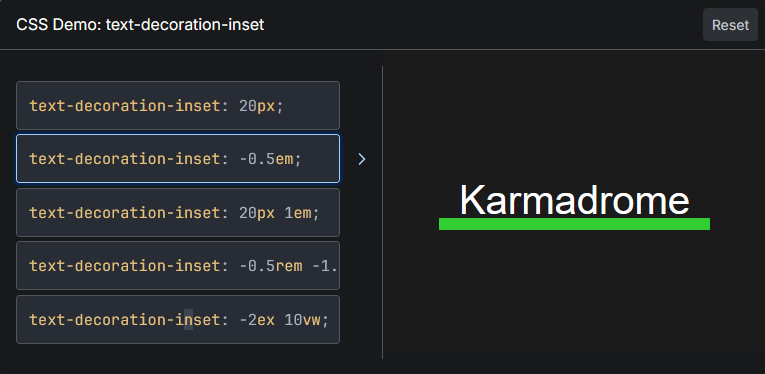
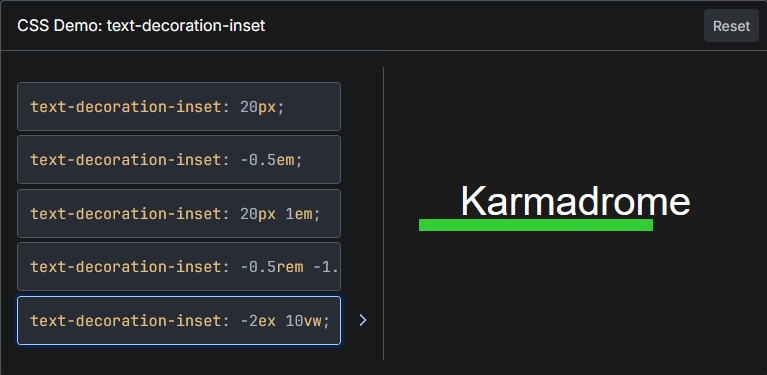
The introduction of the text-decoration-inset property allows you to adjust the start and end points of text decoration using text-decoration . The basic usage of the text-decoration-inset property is to specify the size of the start and end points of text decoration.
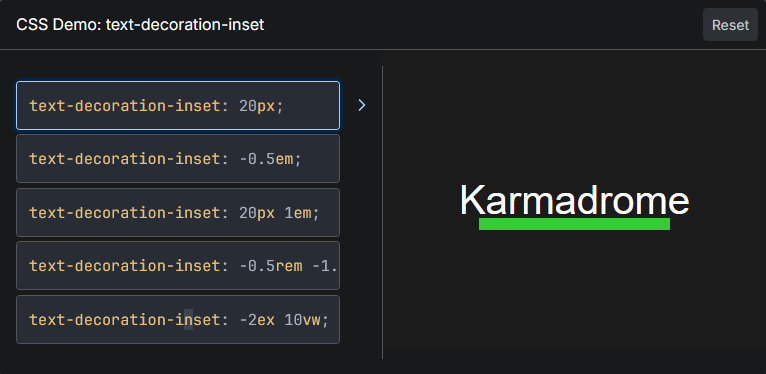
The size can be specified as a negative value.
You can also specify two sizes, specifying the start and end points separately.
◆Other updates
- When using the English version in France, Germany, or Italy, holidays and other important dates will now be suggested in English in the address bar.
- Dedicated GPU process now available by default on macOS
Native support for fractional scaling displays when using Wayland on Linux
- Fixed an issue where tabs could not be selected when the cursor was placed at the top of the screen and Firefox was maximized on a specific monitor on Windows.
ML-KEM : Support for sending post-quantum cryptographic key agreement during the DTLS 1.3 handshake for WebRTC connections
Support for compressed elliptic curve points in WebCrypto
Skia graphics library improves rendering performance and compatibility
Support for the -webkit-fill-available legacy keyword: an alias for the stretch keyword that can be used for width and height.
- Opt-in workflow for the 'New Tab Weather' feature is now available in the EU and some other countries.
- When timepicker is enabled for <input type='time'> or <input type='datetime-local'>, full keyboard and input assistance features are now available.
Phased rollout
- Added a function to automatically protect passwords, bookmarks, etc. in the Windows version.
- Added the ability to skip the search page and see results directly from typing in the search bar
◆ Discontinued functions
- Discontinued support for Direct2D on Windows
Firefox 146 also includes 13 security bug fixes .
The next major version, Firefox 147, is scheduled to be released on Tuesday, January 13, 2026 local time.
Related Posts:








in Software, Posted by log1c_sh