How to run unsupported iOS on deprecated devices
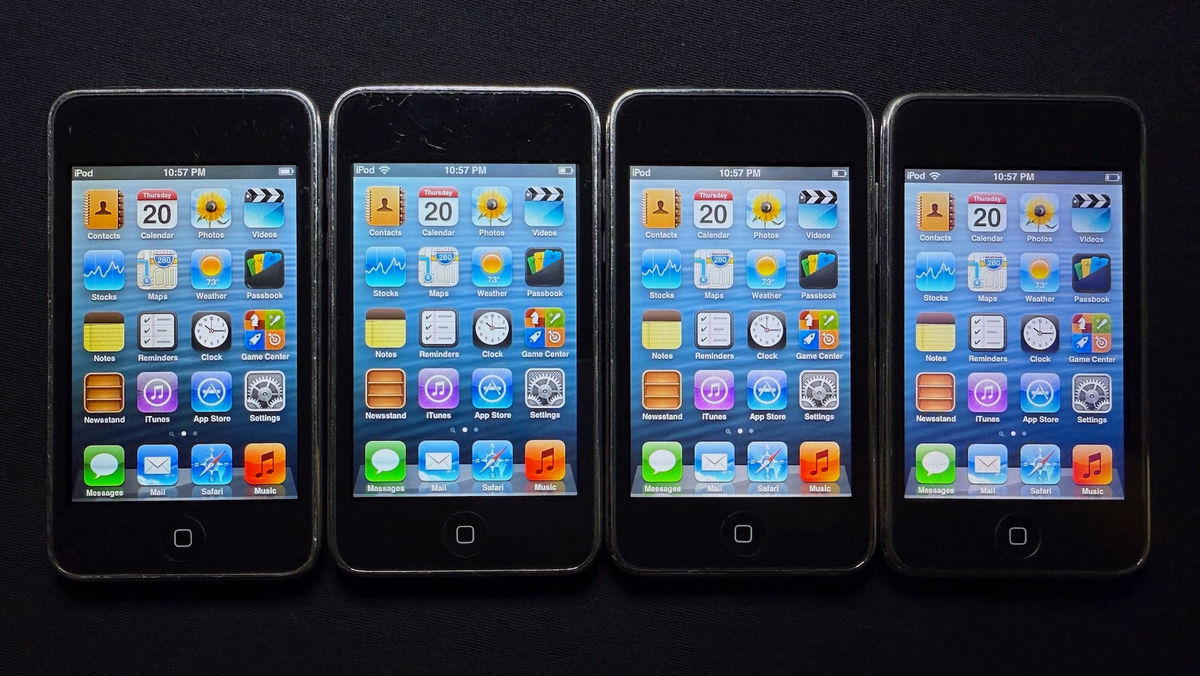
Normally, Apple products perform strict verification using digital signatures when installing firmware, making it impossible to install an iOS version not approved by Apple onto a device that is not eligible for the update. However, software developer john (@nyan_satan) has revealed a technical method that overcomes these restrictions and allows iOS 6 to run on an iPod touch 3 that is not eligible for the update.
Running unsupported iOS on deprecated devices
https://nyansatan.github.io/run-unsupported-ios/
◆ iOS components
iBoot
There are four types of boot loaders: iBSS, iBEC, LLB, and iBoot.
- Kernel cache
The OS kernel and drivers combined into a single binary blob.
・Device tree
A structured list of hardware used by a particular device model, along with parameters that specify the behavior of the software, and can be heavily modified by iBoot before jumping to the kernel.
・User space file system
A small restore RAM disk dedicated to the OS installation, or the actual root filesystem of iOS.
・Firmware for various coprocessors
For co-processors inside or outside the main SoC, such as baseband, Wi-Fi, Bluetooth, multi-touch, etc.
◆Test on iPhone 3GS
The iPhone 3GS, released in 2009, is equipped with very similar hardware, the S5L8920X SoC, while the iPod touch 3 is equipped with the S5L8922X SoC. The iPhone 3GS officially supports iOS 6. Before working on the iPod touch 3, we ran iOS 6.0 on the iPhone 3GS using iOS 5.1.1 iBoot and Device Tree to test whether it would break anything.
◆Modify the device tree
iOS 6 adds a number of new nodes and properties, so to automatically correct the device tree, I wrote a Python script to decode the two device trees and calculate the diff. One of the new properties that iBoot fills in at runtime is nvram-proxy-data in the chosen node. The property must contain the raw NVRAM dump; leaving it empty will cause the kernel to stall very early. For the iPod touch 3, I had to clean up the iPhone-specific elements from the diff before applying it to the iPod's iOS 5.1.1 device tree.
◆ Change iBoot
iBoot didn't require any major changes, just the usual Image3 signature checking patch, boot-args insertion, and debug-enabled patch to make the kernel actually respect the AMFI boot-args.
The key point is that for normal boots, nvram-proxy-data is dynamically populated. For restore boots, a random NVRAM hardcoded in DeviceTree is fine, but for normal boots, if it decides to sync at some point, the actual NVRAM will be overwritten with a random one. So we replace the call to UpdateDeviceTree() with our own little function, which dynamically populates the actual nvram-proxy-data and random-seed. We always add amfi=0xff to boot-args to disable code signing, which is standard practice.
◆ Creating a kernel cache
The most complicated part was the kernel cache. Although the iPod touch 3 never officially received iOS 6, nearly all internal iOS 6 builds included the standalone S5L8922X kernel and standalone kexts, including some specific to the iPod touch 3. Initially, we considered dynamically loading all kexts at the bootloader level, like the old MacOS X. Here's our strategy:
In the iBoot context, load all kexts from the file system.
- Layout in memory and add a corresponding entry to the chosen/memory-map node in the DeviceTree.
- Boot a standalone kernel and the kernel will link the kext and entry.
However, the result was a failure. The kernel contained code to retrieve all kexts, but not the code to actually link them. So I realized that pre- Apple Silicon macOS generated a kernel cache containing all kexts, and came up with the idea of using that logic to build an iOS kernel cache. I used /usr/local/bin/kcgen from macOS Sierra , but it seems that the kextcache included by default in the latest macOS should also work.
The main options of the kcgen command are:
-c output.bin
Specifies the output file to write the resulting kernel cache to.
-arch armv7
Build armv7 slice only.
-all-personalities
An important flag that prevents irrelevant IOKit personalities from being removed. 'Relevant' means 'irrelevant to the current machine', meaning that everything related to the iPod touch 3 will be removed.
-strip-symbols
Remove unnecessary symbols. The flag can theoretically be omitted, but it is recommended to keep it to reduce the resulting kernel cache.
-uncompressed
Don't apply compression. You'll need to make one small change later, and then you'll need to reapply compression.
A small change is that the fat header needs to be removed, and for some reason a fat Mach-O with a single slice is created, which iBoot doesn't recognize, so run ' lipo -thin armv7 output.bin -o output.thin.bin ' to remove the fat header. Once the kernel cache is ready, it needs to be compressed and packaged into an Image3 container.
◆ Change IOKit personality
In this particular case, I needed to modify the Info.plist file of the Wi-Fi kext. I have provided example code in the repository .
◆RAM disk and file system for restoration
Here you need to patch the asr as usual and move options.n88.plist to options.n18.plist so that the partitions can be laid out properly, but you also need to install the iBoot exploit, so I've reimplemented the rc.boot binary.
Remount the RAM disk and set the umask to the same as the original.
Call restored_external with the -server argument to prevent rebooting after the restore is complete.
If the restore completes properly, add a third partition, write the exploit there, and set boot-partition to 2.
Restart your device
Please refer to the implementation code .
◆ Changing the root file system
- Added SpringBoard hardware feature plist
It is based on iOS 5.1.1 version and adds iOS 6 specific features. It also merges iOS 5.1.1 layout for iPod touch 3 with 6.x layout for iPod touch 4, preserving the original home screen icon order.
-Added multi-touch and Wi-Fi firmware
- Added Bluetooth firmware and scripts
Extract both the firmware and scripts from BlueTool 5.1.1 and overwrite the hardcoded ones in /usr/sbin/BlueTool with the files in /etc/bluetool.
・Removed the FairPlay daemon restriction
The FairPlay daemon is limited to the N88AP (iPhone 3GS). It can also work on the iPod touch 3 by simply removing the LimitLoadToHardware key in the LaunchDaemon plist, but it's more difficult in iOS 6.1 and later, because LaunchDaemons are loaded from a signed cache. However, it can be bypassed in many ways, such as patching launchd or forcing a different plist to load via launchctl.
・DYLD shared cache patch
Regarding the Product ID map patch, iOS 6 introduced the concept of a 'product ID' in the form of a long byte string, which is entered into the product node of the DeviceTree by iBoot. We hard-coded the iPhone 3GS value (8784AE8D7066B0F0136BE91DCFE632A436FFD6FB) directly into the DeviceTree. The identifier also has a short form (a 16-bit integer), which existed before iOS 6. The iPhone 3GS is 0x2714, and the iPod touch 3 is 0x2715. So we swapped 0x2714 for 0x2715.
MobileGestalt hit the nail on the head again with their getDeviceVariant() patch. The device variant is a letter, usually 'A' or 'B,' that appears to depend on the Wi-Fi transceiver vendor used by the exact device. iOS 6 couldn't determine this value for the iPod touch 3, causing the activation process to crash, so they patched the function to always return 'A.'
Shared cache files have the same signature format as regular Mach-O files, and because they are ad-hoc, you simply recalculate the SHA-1 hash of any pages you change and update the signature in a hex editor.
iBoot Exploit
iOS 5 iBoot had a bug in the HFS+ filesystem driver, so we reimplemented it from scratch.
Conclusion and future plans
'It was easier than I initially expected,' NyanSatan said. 'The jailbreaking tool won't work, but it should be as simple as patching the kernel and dropping the Cydia tarball into the filesystem.'
He also plans to soon try out the iPad 1, another device Apple stopped supporting that year, and says, 'I hope this information helps me create other crazy combinations, like iOS 4 on an iPhone 4S and iOS 5 on an iPad mini 1.'
Discussion
Discussions are underway regarding support for older devices.
・Criticism of Apple's end-of-support policy
There are complaints and criticisms about Apple's specification that does not allow users to download older compatible versions of apps unless they have previously downloaded them.
・Developer circumstances
Developers point out that spending thousands of development hours to support old phones that almost no one uses is a poor return on investment.
- Calls for opening up old devices
It is said that forcing companies to open up about devices that are no longer officially supported would allow for better use of old hardware, but economic justification would need to be provided, and some have said that this is extremely unlikely in today's environment.
-Comparison with OpenCore Legacy Patcher for Mac
During the discussion, there was mention of OpenCore Legacy Patcher , which allows Macs to run unsupported versions of macOS, and Project Sandcastle , an attempt to install Android on iPhones.
Discussion of the practicality of older devices
One negative comment about the usefulness of older devices: the 2013 iPad Air was dual-core and only had 1GB of RAM, barely able to even browse the web with acceptable performance today. While it could be used as a server or smart display, the average user has moved on to newer devices and isn't looking for niche secondary uses.
・Proposing a realistic approach
It was pointed out that we need to accept these devices as temporary possessions, almost like leasing, and accept the reality that only 5% to 10% of buyers of devices like the 2013 iPad Air reuse them.
Discussion about the lifespan of Apple devices
Some have argued that it's not a good idea for Apple to make expensive devices completely obsolete within seven years, pointing out that Android and PCs are generally much cheaper for comparable features and performance.
Related Posts:


in Software, Smartphone, Posted by darkhorse_logmk