Facebook may be scanning your phone's photos without your permission

Facebook has added a new feature that scans photos stored on users' smartphones to create collages and suggest photo posts. Proton has published a critical article claiming that the feature scans users' photos without their permission.
Is Meta AI scanning your camera roll? Here's how to check | Proton
According to Proton, Facebook is displaying a pop-up asking users to consent to cloud image processing, which requires them to process images stored on their smartphones in the cloud. This feature is used for things like 'automatic collage creation' and 'automatic image suggestions for posting.' However, Proton points out that 'Meta cannot determine what is contained in an image before analyzing it. Therefore, Meta needs to scan every image stored on your phone. This means that images of your ID, medical records, financial records, private moments, and more could all be scanned.'
Proton also pointed out to Facebook that the image processing feature uses AI, and pointed out that the AI terms of service include a sentence that states, 'By sharing images with our AI, you consent to Meta using AI to analyze your facial features, etc.' This could lead to the analysis of the faces of people who have not consented to the terms, such as 'your friends and family,' stored on your smartphone.

Additionally, there have been reports online of users who have had their image scanning feature enabled even though they did not see a pop-up requesting consent to cloud image processing.
View this post on InstagramA post shared by India Horner | Journalist (she/her)(@infocus_withindia)
Proton recommends changing the following settings to prevent Facebook from scanning your images: First, open the Facebook app, tap 'Menu' in the bottom right corner of the screen, then tap 'Settings' under 'Settings and Privacy.'
Tap 'Suggest sharing camera roll.'

Toggle off 'Custom sharing suggestions from your Camera Roll' and 'Show Camera Roll suggestions while browsing Facebook.'

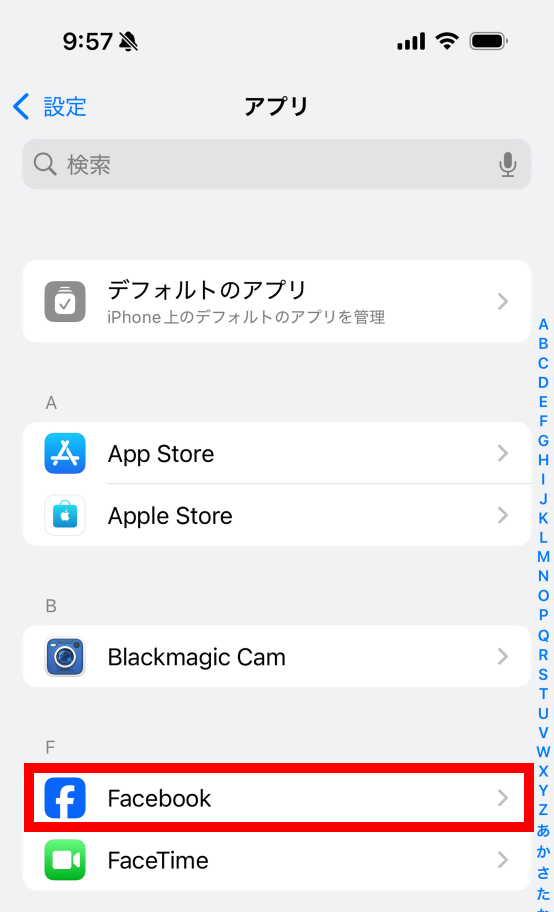
Also, on iPhone, you can restrict Facebook's access to photos itself from the Settings app. Tap 'Apps' in the Settings app.
Tap 'Facebook.'
Tap 'Photos.'
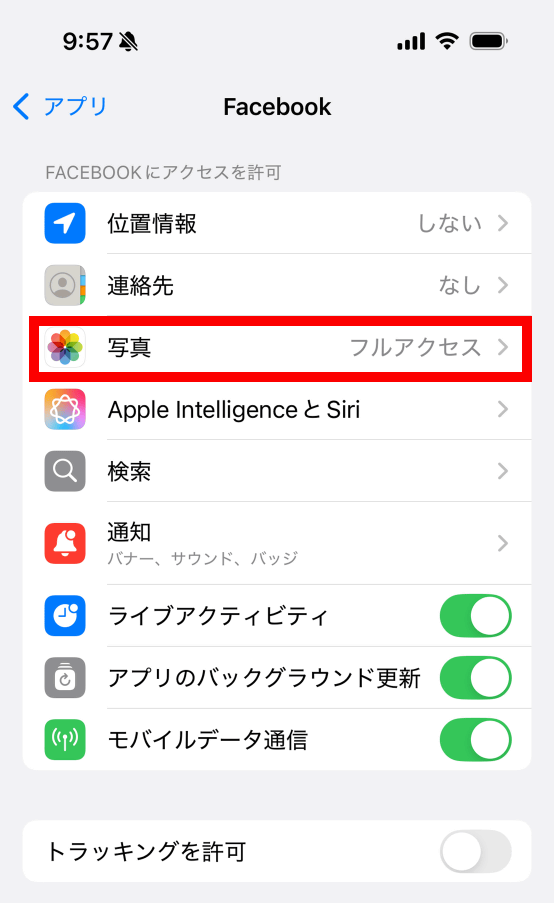
You can disable Facebook's access to your photos by tapping 'None,' or you can choose which photos Facebook can access by tapping 'Limited Access.' However, these restrictions also apply to regular photo posts, so you'll need to consider the trade-off between convenience and the settings.